RSS

Category Archives: Technical

The posts under this category, exclusively contain the technical related information. It contains information about Computer rlated concepts, engineering, advancements in the technology etc.

Project Management System


Image

In the present Software World, Project problems are frequently caused by ineffective project management. As the result projects are late, project costs exceed expected values; organization has problems with clients, stakeholders, and personnel motivation.

Project Management helps to solve these problems. It is a set of processes, tools, and templates used to effectively plan and manages project work.

Although identified as distinct processes, in practice, the processes overlap and interrelate. Some processes are iterative; repeated and revised throughout the life of a project. Seasoned project managers acknowledge there are many ways to manage a project. As organizations evolve in maturity level, PMs will be better equipped to determine which processes to utilize and how rigorously to apply these processes to deliver the project.

The particular SDLC depends upon agency standards and the type of project undertaken.  Although terminology can differ, the Project Management and System Development Life Cycle methodologies can be easily integrated.

Image

Image

Advantages of PMS:

The advantages of establishing sound project management practices are:

  1. Improves overall project performance
  2. Increases projects delivered on-time and within budget
  3. Reduces project risk
  4. Enhances quality
  5. Improves inter and intra-project communication
  6. Establishes a consistent standard that everyone can follow
  7. Utilities a common project management terminology

Good project management requires:

n  Defining measurable and achievable goals that shall be met in the specified time period.

n  Defining proper project success criteria that will motivate project personnel to achieve organizational business goals,

n  Application of project management software that helps to plan, to analyze, and to control project execution,

n  Implementation of the organizational structures that support project management processes,

n  Implementation of the project participant’s award and recognition system that motivates project teams to achieve project goals.

1. Origination Stage:

Purpose

The Origination Stage is a set of agency specific processes. The purpose of this stage is to identify Secretariat and agency priorities and align these priorities with the Commonwealth’s strategic direction so that resources can be targeted at strategically important initiatives. The specific templates used in this process will vary based upon the agency project prioritization and selection processes.

1.1 Inputs

  • Commonwealth’s strategic priorities
  • Secretariat and Agency priorities
  • Feasibility Studies
  • Potential funding sources
  • Project prioritization and selection processes

 Image

1.2 Outputs

  • Project justifications in Agency specific format (e.g. Business Case, Cost/Benefit Analysis)
  • Complexity Matrix
  • Approved and funded projects
  • Origination Stage Checklist

2. Initiation Stage:

Purpose

The goal of this stage is to verify project needs and feasibility.  The project manager, in conjunction with the sponsor and key stakeholders specify:  goals, objectives, and critical success factors.  Funding sources are confirmed. Formal approval to proceed with the project, as defined in the Charter, is secured.

2.1 Inputs

  • Authorized projects with funding
  • Project Manager assigned
  • Project documents created during Origination Stage (e.g. Cost-Benefit Analysis)
  • Consultations with subject matter experts and sponsor
  • Governance Guidelines
  • Independent Verification & Validation Guidelines
  • Complexity Matrix

Image

2.2 Outputs

  • Completed Complexity Matrix
    • Project Level Determined
    • Governance Structure defined
    • Decision made on whether an Independent Verification and Validation (IV&V) is required. If required, specify the type of IV&V to be funded
  • Approved Charter and authorization to apply Commonwealth’s resources
  • Project Tracking Log (Action Items, Issues, Risks, Dependencies and Key Decisions)
  • Repository Setup
  • Initiation Stage Exit Checklist

3. Planning:

Purpose

This stage establishes the framework for the project so the work can begin.  Information is assembled into the scope statement and plans from numerous sources, each with varying degrees of confidence.  Activities and resources are arranged to deliver the product and/or service and task ownership is assigned and communicated.

Planning is highly iterative and involves key team members and stakeholders. Each iteration produces increasingly more precise and reliable project management information.  Although the graphic below depicts a suggested workflow, the project manager will determine the most appropriate sequence of activities given the nature of the project.

Time invested during this stage to develop the structure to organize and manage project activities significantly improves performance during the Execution and Control Stage.

3.1 Inputs

  • Project Tracking Log (Action Items, Issues, Risks, Dependencies and Key Decisions)

Image

3.2 Outputs

  • Budget
  • Scope Statement
  • Resource Plan
  • Baseline Project Plan & Schedule Tracking Template
    • Work Breakdown Structure (WBS)
    • Schedule, Milestones, Critical Path
    • Resource Assignments, Dependencies
  • Risk Management Plan, Issues Management Plan,
  • Quality Management Plan , Change Management Plan
  • Updated Project Tracking Log (Action Items, Issues, Risks, Dependencies & Key Decisions)
  • Transition Plan & Checklist
  • Status Report
  • Planning Stage Exit Checklist
  • Project Kick-off Meeting

4. Execution & Control:

Purpose

The Execution and Control stage is when the tasks that build deliverables are executed and the detailed work gets done.  Plans developed during the Planning Stage are executed.  Performance measures are taken to determine whether the project deliverables and objectives are being satisfied.     Monitoring and controlling processes focus on collecting and disseminating information and measurements on:  scope, schedule, costs, resources, quality, issues, and risks. The objective of regular monitoring is to make adjustments to corrective variances so that problems can be avoided.  If it is not possible to avoid particular problems, corrective measures must be identified and applied quickly to get the project back on track.   This stage ends when the product and/or service has been delivered and formally accepted by the project sponsor.

4.1 Inputs

  • Budget
  • Schedule Management Guidelines
  • Project Plan & Schedule
  • Risk Management Plan, Issues Management Plan,
  • Quality Management Plan , Change Management Plan
  • Communication Plan & Register
  • Procurement Plan & Contract Administration
  • Transition Plan, Transition Checklist
  • Monitoring & Control Processes
    • Scope Control, Cost Control, Quality Control, Change Control
    • Stakeholder Management
    • Risk Analysis, Issues Management & Unresolved Escalation Items
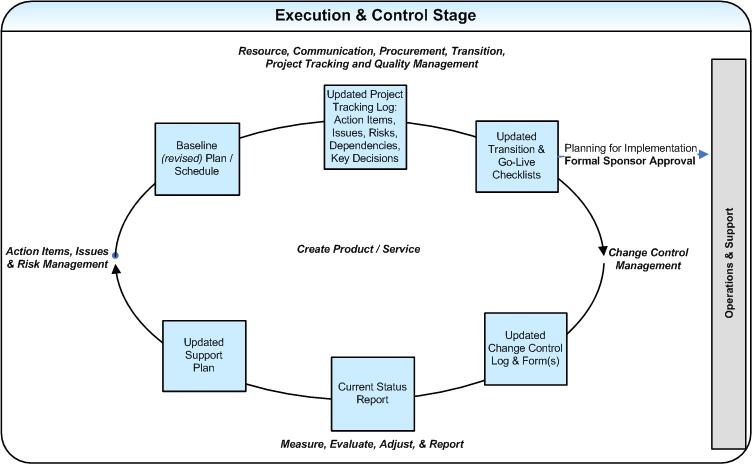
Image

4.2 Outputs

  • Recommended Corrective & Preventive Actions
  • Recommended Preventative Actions
  • Performance, Dashboards and Status Reporting
  • Change Control Forms & Change Control Log
  • Current Budget vs. Actual Tracking
  • Current Project Plan & Schedule Tracking
  • Current Communication Register
  • Current Project Tracking Log (Action Items, Issues, Risks, Dependencies and Key Decisions)
  • Current Transition Checklist & Go-Live Checklist
  • Current Procurement Tracking
  • Current Quality Tracking Log
  • Executed Contracts
  • Execution and Control Stage Exit Checklist
  • Final Product/Service
  • Formal Product/Service Acceptance by Sponsor

5. Closure:

Purpose

This is the final stage in the project life cycle and is triggered when the sponsor accepts the project.  The objectives of this stage are to: transition the product, services and deliverables to operations and support; logically complete administrative and logistical close-out activities; and capture performance information that will help improve future projects.

Due to the broad range of process activities, Closure occurs over a period of time.  Acceptances and procurement close-outs occur immediately after the project is delivered; while post implementation review workshop sessions, surveys and lessons learned sessions typically occur approximately 4-6 weeks after the official implementation/transition of the project. The goal is to allow for sufficient time to lapse so that the full extent of benefits and short-comings of the project can be identified and discussed.

5.1 Inputs

  • Survey/interview key stakeholders including: team members &  support.
  •  Post implementation review and lessons learned sessions
  • Existing contracts

Image

5.2 Outputs

  • Project deliverables turned over to operations, support and help desk
  • Post Implementation Review Surveys, Report
  • Post Implementation Documented/shared Lessons Learned and Project Successes
  • Contracts closed out; other procurement processes closed
  • Team disbanded; financial accounts closed; equipment & facilities redistributed
  • Project documentation collected and updated in repository.
  • Closure Stage Exit Checklist
 
Leave a comment

Posted by on April 24, 2012 in Technical


Roles & Responsibilities of Software Tester


Software Testing is more than finding the bugs. It can be stated as Set of activities which are performed to check whether the application is designed, developed & working as per the customer requirements or not?

Purpose of Software Testing:

Software testing can be defined as the process of validating and verifying that a software product. Testing is conducted to check whether;

1)      Application is designed as per customer requirements.

2)      Working as per the customer requirements.

3)      Any bugs exist in the application.

Facts about Software Testing:

  • Testing is not done to provide the Quality. It is conducted to find the bugs.
  • Through testing we can’t get 100% bug free product, it’s not possible all the time.
  • Testing is all about checking all possible conditions i.e.  valid & in valid conditions.
  • In order to test any application one should know application flow.
  • Minimum Data Base knowledge is required to understand how data flow is happening between front-end & back-end application.
  • Testers should not test the application from developers view, should test application from customers view.

Roles & Responsibilities of Testers in a Project:

  • Understanding Application related Documents:

It is very much important to get clear idea on the application i.e. need of the application, work flow of the application and also should go through the requirements documents & should review them

  • Assist with preparation of test plan:

Testing process start with the preparation of Test Plan. Test plan is a document which includes introduction, assumptions, list of test cases, list of features to be tested, approach, deliverables, resources, risks and scheduling. It will be prepared by the Lead. As a tester it’s your responsibility to take part in the preparation of Test Plan.

  • Preparation of Test Cases:

Before preparing the test cases it’s very necessary to have an idea on the application work flow. The basic objective of writing test cases is to validate the testing coverage of the application. Every organization has their own test case formats.

There is no assurance that, the person who authored test cases will execute them. So while preparing the test cases see that they simple, easy to understand & all the steps were in proper sequence, so that it will easy for the executioners to execute them.

  • Preparation of test scripts:

If it’s necessary to automate the application, if organization accepts & if client is ready, basing on the requirement we can automate the application.

Preparation of test scripts is very crucial in the Automation process. For generating the scripts programming i.e. coding knowledge is required.

  • Preparation of Test Data:

Test Data is the data which is used to test the application. Test Data may be provided by the client or if it’s necessary we have to prepare the Test Data. During the execution of test cases, we use test data and test the application. Basing on the test data the coverage of testing will depend.

There are different mechanisms which are used in preparation of the test data:

1)      Boundary Value Analysis.

2)      Equivalence Class Partition.

3)      Error Guessing

  • Execution of Test Cases:

Executing the test cases is one of the important phases in Testing. Execution is nothing but running the cases on the application. The Test cases should be executed in the manner specified. If there is no time to execute all the Test Cases, we have to execute the High Priority test cases first & then if the time permits others.

  • Defect Tracking:  It is the process of finding defects in a product or in Software. The defects found during the process of testing should be tracked. The defects are entered into Bug tracking tool for better maintenance.

Bugs can be detected through;

1)      Smoke Testing.

2)      Test Cases Execution.

3)      Adhoc Testing.

4)      Regression Testing.

5)      Priority Based Testing.

6)      Exploratory Testing.

  • Retest fixed defects:

Once if the development team fixes the bug, we have to retest the application or that particular functionality.

  • Attending Client Calls & Team Meetings:

It is very much important to attend the client calls or scrum calls. If we have any issues regarding requirements, validations etc, we can directly interact with the client and can get resolved. Team meetings are very important because, we can know what’s happening within the team & how tasks are being done, status of the application, any enhancements etc. If we have better ideas to develop the application we can share with the development team.

  • Status Report:

It is a good practice to maintain Work Sheet. During the time of reviews it will be very much useful & also we can make self analysis of the tasks that we have completed and tasks that are pending. In few organizations it is mandatory, to update status report daily.

  • Assist the team members:

If it’s necessary & if it’s possible assist your team mates, in order to complete their duties.

  • Be a Good Team Player:

Whether you are developer or tester it is very much important to have rapport with the members in the team.

 
1 Comment

Posted by on March 21, 2012 in Technical


Approach for System Testing


Approach for System Testing


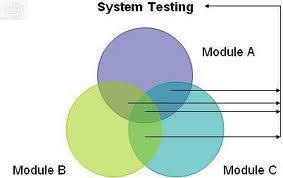
System testing of software is a testing process which is conducted on a complete, integrated system to evaluate the system’s compliance with its specified requirements whereas Functional testing is testing each and every functionality of the application individually.

System testing is testing the application as a whole, without leaving even a single object. This type of testing involves testing of the functionality, performance, security; user interfaces etc, System testing falls under black box testing. It doesn’t require the programming knowledge. In system testing software test professional aims to detect bugs, both within the interfaces and also within the software as a whole. However, during the integration testing of the application the software test professional aims to detect the bugs / defects between the individual units that are integrated together.


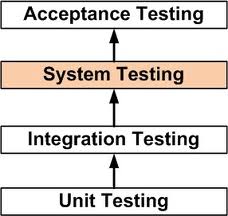
During the development developers perform the unit testing. After the integration of all components of the software being developed, the whole software system is rigorously tested to ensure that it meets the specified business, functional & non-functional requirements. System Testing is done after the unit testing and integration testing are completed. In many organizations there are separate and dedicated teams for performing System Testing.
Why system testing is Important?

 System Testing is a crucial step in Quality Management Process.

1)   The System Testing enables us to test, verify and validate both the Business requirements as well as the Application Architecture matches.

2)   The System is tested to verify if it meets the functional and technical .requirements.
3)   The application/System is tested in an environment that closely resembles the production environment where the application will be finally deployed


Pre Requisites for System Testing:

The prerequisites for System Testing are:
A)  All the Individual components should have been successfully Unit Tested.
B) All the components must have been integrated and Integration .Testing should be completed.
C) Test environment should be ready to carry out testing process.

Steps needed to do System Testing:

The following steps are important to perform System Testing:
1: Create a Test Plan
2: Create Test Cases
3: Identification of test data for system testing.

4: Create Scripts if necessary

– Build environment and
– to automate Execution of test cases
5: Execute the test cases
6: Fix the bugs if there are any and perform regression testing

7: Repeat the test cycle.

What is a ‘System Test Plan’?

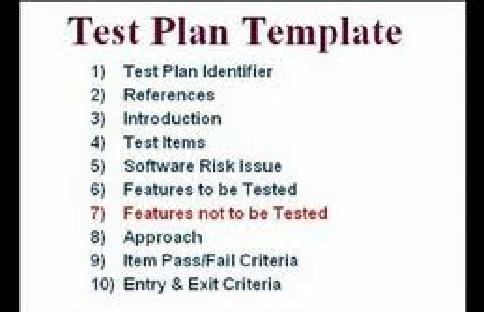
Test plan is a document which includes introduction, assumptions, list of test cases, list of features to be tested, approach, deliverable s, resources, risks and scheduling.

The contents of a software system test plan may vary from organization to organization or project to project. It depends how we have created the software test strategy, project plan and master test plan of the project. However, the basic contents of a software system test plan should be:

– Scope
– Goals & Objective
– Area of focus (Critical areas)
– Deliverable s
– System testing strategy
– Schedule
– Entry and exit criteria
– Suspension & resumption criteria for software testing
– Test Environment
– Assumptions
– Staffing and Training Plan
– Roles and Responsibilities
– Glossary

How to write system test cases: The basic objective of writing test cases is to validate the testing coverage of the application. The system test cases are written in a similar way as we write functional test cases. However, while creating system test cases following points needs to be kept in mind:

They cover all the use cases and scenarios

– The Test cases were prepared as per the technical Requirements and Specifications.
– The Test cases validate the technical Requirements and Specifications
– The Test cases verify if the application/System meets the Business & Functional Requirements specified
– The Test cases may also verify if the System meets the performance standards

There is no assurance that, the person who authored test cases will execute them. So while preparing the test cases see that they simple, easy to understand & all the steps were in proper sequence, so that it will easy for the executioners to execute them.


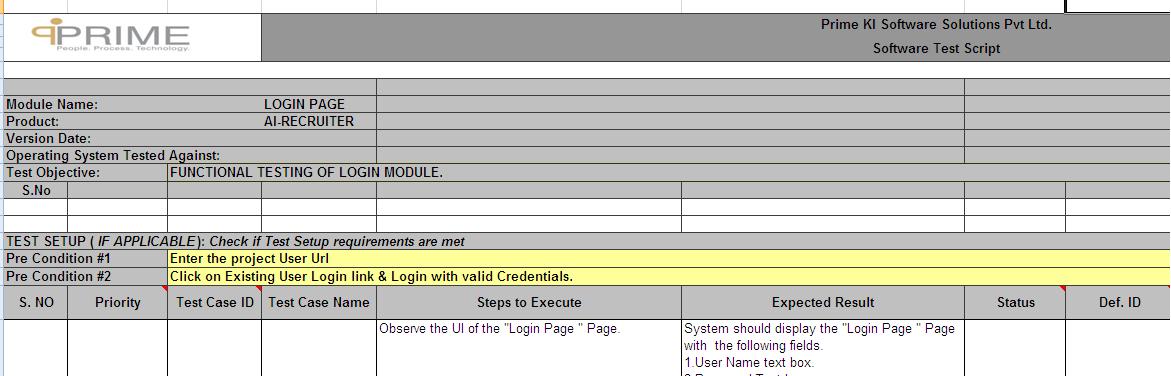
The Test Case Template format: Every organization has their Test Case Template. The format varies from one organization to other.

  • Test Case Name
  • Steps to Execute – Steps to follow for execution of the test case
  • Expected Result
  • Status
  • Defect Id.
  • Severity
  • Comments.

Steps for Effective System Testing:

There are various factors that affect the success of System Testing:

1) Test Coverage:   Test Coverage means the test cases that were designed & then executed should cover all the requirements, Functionalities as per the use cases, Business Requirements, Technical Requirements, and Performance Requirements. System Testing will be effective only to the extent of the coverage of Test Cases. Adequate Test coverage implies the scenarios covered by the test cases are sufficient. The Test cases should “cover” all scenarios.

2) Test Execution:   Executing the test cases is one of the important phases in STLC. The Test cases should be executed in the manner specified. If there is no time to execute all the Test Cases, we have to execute the High Priority test cases first & then if the time permits others.

3) Defect Tracking:  It is the process of finding defects in a product or in Software. The defects found during the process of testing should be tracked.

4) Build Process Automation: A Lot of errors occur due to an improper build. ‘Build’ is a compilation of the various components that make the application deployed in the appropriate environment. The Test results will not be accurate if the application is not ‘built’ correctly or if the environment is not set up as specified. Automating this process may help reduce manual errors.

5) Test Automation: Automating the Test process could help us in many ways:

a. The test can be repeated with fewer errors of omission or oversight

b. Some scenarios can be simulated if the tests are automated for instance
simulating a large number of users or simulating increasing large amounts
of input/output data

6) Documentation: Proper Documentation is very much necessary. It helps us to keep track of No.of test cases executed, bugs raised, etc. It provides clear picture about the tasks that were done & to be done.  It also helps create a knowledge base for current and future projects..

 
Leave a comment

Posted by on February 24, 2012 in Technical


Design a site like this with WordPress.com
Get started